By TherapyNotes®, LLC on October 8, 2026

This release brings new ways to turn practice and clinical information into meaningful context in TherapyNotes®. We’re introducing Insights, a new area for greater visibility into practice activity, starting with scheduling-related reporting. We’ve also enhanced TherapyFuel® Session Assist with additional clinical context to help clinicians prepare for upcoming sessions. Plus, we’re giving you an early look at a refreshed TherapyNotes® navigation experience coming next week.
Here’s what’s new.
New Insights Page for Practice-Wide Reporting
We’re introducing Insights, a new reporting solution in TherapyNotes® that gives Practice Administrators a high-level view of their practice. The first insights available focus on practice scheduling. The new Insights page will begin rolling out gradually over the next few weeks. When it becomes available for your practice, you’ll see Insights in the left sidebar.
The Insights page’s Scheduling Dashboard brings key metrics and trends together in one place, helping you monitor appointment activity, identify patterns, and answer questions such as:
-
How is appointment volume changing over time?
-
How often are appointments missed or canceled, and how frequently are fees charged?
-
How well are we retaining patients after intake, and where are we seeing churn?
-
How does appointment activity compare between in-person and Telehealth sessions?
-
Which appointment types are scheduled most often?
-
How does scheduling and appointment engagement vary across clinicians and locations?
Use dashboard filters such as Clinician, Location and Date Range to focus your analysis on the clinicians, locations, and reporting periods most relevant to your practice.
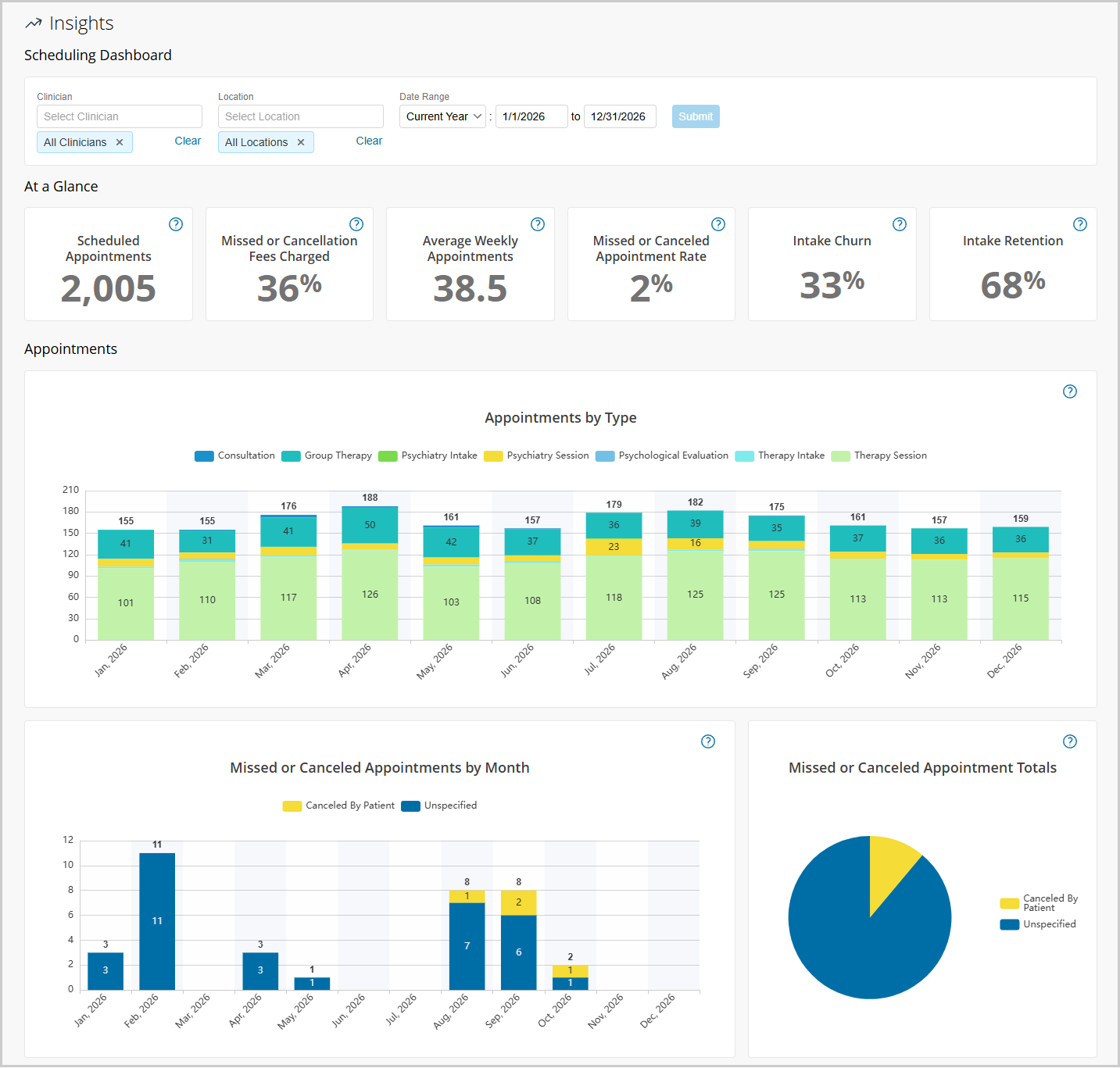
Explore Your Scheduling Data
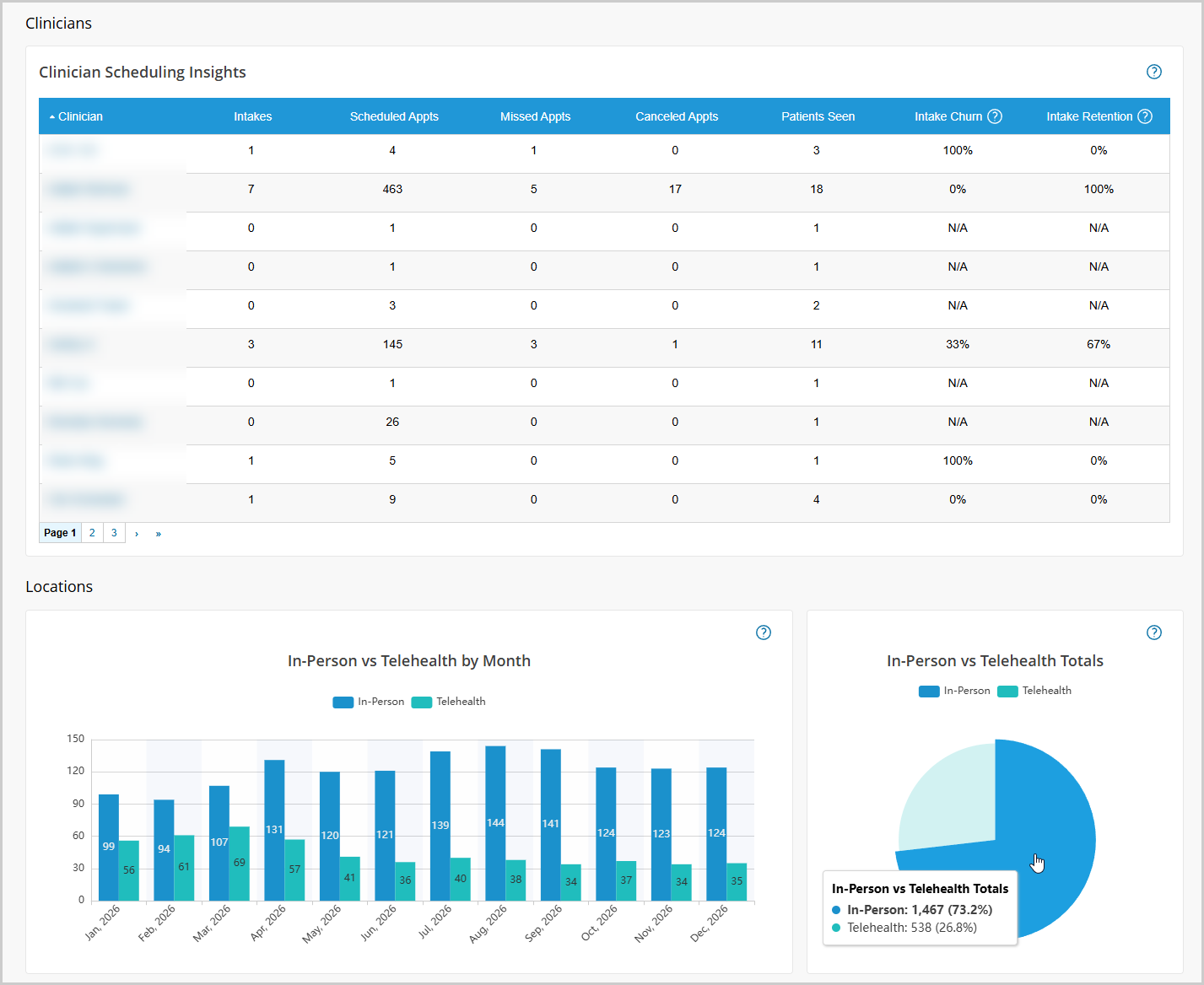
Interactive charts and tables make it easy to explore scheduling activity across your practice. Hover over charts to see additional details about the metrics displayed, and use the question mark tooltips throughout the dashboard to learn more about individual graphs and tables.
Dedicated Clinician and Location statistics let you dig deeper into activity across your team and practice locations. Review metrics such as intakes, scheduled appointments, missed and canceled appointments, patients seen, retention, and churn to identify differences across clinicians and locations that may help inform staffing and scheduling decisions.
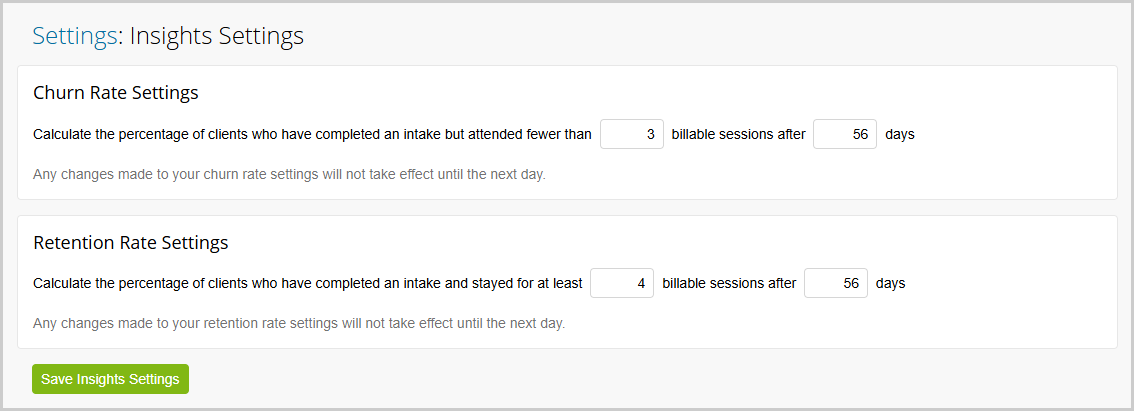
Define Intake Churn and Retention for Your Practice
Every practice may evaluate follow-up after intake differently. From the new Insights Settings page, Practice Administrators can configure the grace period and minimum number of required follow-up appointments used to calculate intake churn and retention. These settings give your practice greater control over how these metrics are defined and reflected in Insights.
By bringing scheduling and appointment-related metrics together in one interactive experience, Insights gives Practice Administrators a clearer view of practice activity and the information they need to make informed decisions about scheduling, staffing, and patient retention. Scheduling-related reporting is just the beginning of the broader Insights experience, with additional data areas and tools planned to give practices greater visibility into their operations and performance.
More Clinical Context in TherapyFuel® Session Assist
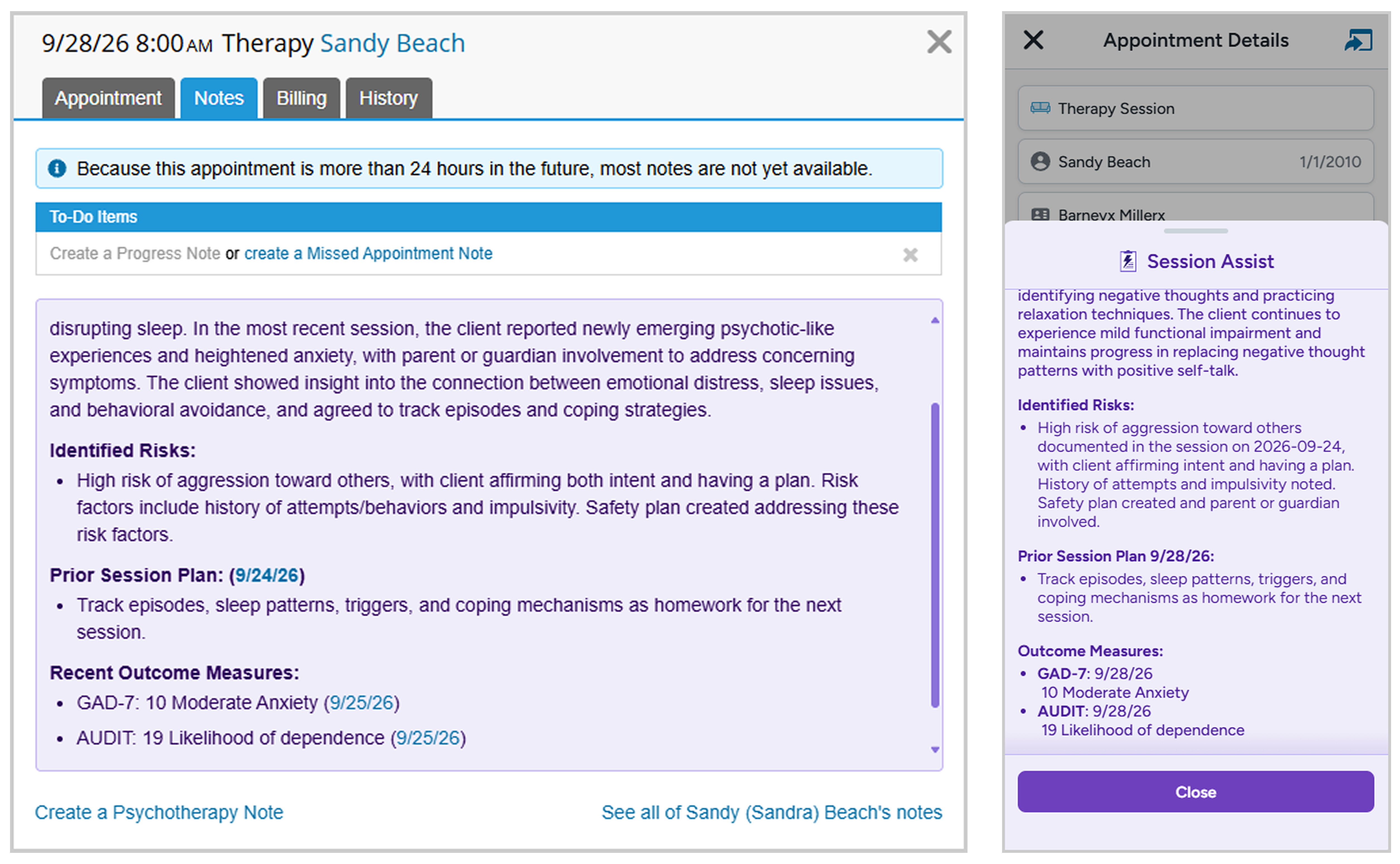
TherapyFuel® Session Assist now gives clinicians even more context to prepare for upcoming sessions. In addition to summarizing information from recent Progress Notes and the current Treatment Plan, Session Assist now surfaces recent Outcome Measure results, making it easier to review meaningful clinical information before the next appointment.
When a patient completes an Outcome Measure after their previous appointment, the measure and its score will appear under Recent Outcome Measures in Session Assist. Clinicians can open the completed Outcome Measure directly to review responses and additional details.
Session Assist also now displays the date of the previous appointment with quick access to the related Progress Note, making it easy to reference the underlying documentation when more detail is needed.
To make session prep even easier to scan quickly, we’ve reorganized the Session Assist summary so information appears in the following order:
-
Recent Summary
-
Identified Risks
-
Prior Session Plan
-
Recent Outcome Measures
These enhancements are available to TherapyFuel® subscribers using TherapyNotes® on the web, and will be coming soon to the TherapyNotes® Mobile App.
Not using TherapyFuel® yet? Session Assist helps reduce time spent searching through the patient chart by bringing relevant information together before upcoming sessions. Ask your Practice Administrator about enabling TherapyFuel® for your practice.
Coming Soon: A Refreshed Navigation Experience
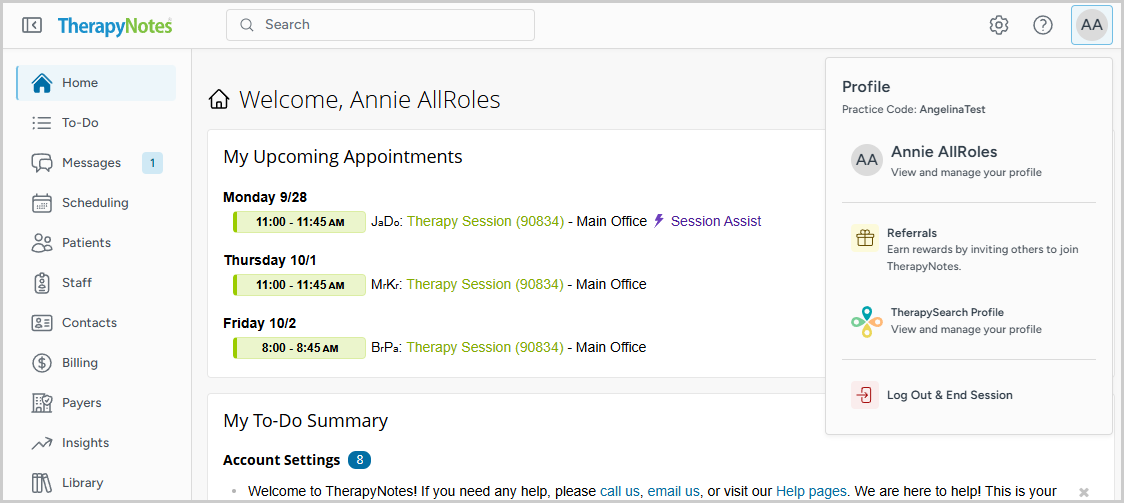
An updated TherapyNotes® navigation experience is coming next week! The refreshed design addresses customer feedback to give you more flexibility and faster access to the tools and resources you use most. You’ll be able to fully collapse the main side navigation, access Global Search from anywhere in TherapyNotes®, and quickly find commonly used tools and resources from the top menus.
We’re giving you an early look so you’ll know what to expect when these changes arrive. Stay tuned for more details next week.
* The content of this post is intended to serve as general advice and information. It is not to be taken as legal advice and may not account for all rules and regulations in every jurisdiction. For legal advice, please contact an attorney.
Get more content like this, delivered right to your inbox. Subscribe to our newsletter.
More Content You'll Enjoy

What’s New: Expanded Insights Access & Telehealth Noise Suppression

Maintenance Release 2026.09