By TherapyNotes, LLC on April 9, 2026

As with all maintenance releases, TherapyNotes® 2026.03 includes numerous system-wide improvements, including bug fixes, performance enhancements, and usability adjustments. This release also includes additional features that will be announced and enabled next week. Here are some noteworthy updates available now.
Reordered Medication List
We’ve updated how medications are organized within psychiatry notes to make them easier to review at a glance. Instead of listing medications in alphanumeric order, medications are now grouped by prescriber. Prescriptions written by the note author appear at the top of the list, followed by medications reported by the client or prescribed by other providers, which are organized alphabetically. This makes it easier to identify your own prescriptions while maintaining visibility into medications managed elsewhere.

This update works in conjunction with other recent improvements we've made to the medication management experience, including:
-
For prescribers using TherapyNotes ePrescribe with DrFirst: Enjoy a fully integrated experience where prescriptions and active medications, including those prescribed by other providers and reported OTCs, are managed directly in DrFirst. Your medication list stays in sync, eliminating the need for double entry.
- If needed, you can make note-specific adjustments using Edit Meds Manually, or update medications through the eRx tab and refresh the note to reflect those changes.
- For medication-managing clinicians (eRx and non-eRx): Medications and supplements now appear in a single, unified list organized by prescriber, with clear status indicators such as New, Adjusted, Stopped, and Reported, along with relevant dates. When documenting within a psychiatry note, you can now enter future stop dates to reflect planned medication changes, even if the stop date occurs after the note date. Please note that this functionality applies to documentation within psychiatry notes and is not yet supported in DrFirst medication entries.
- Medication comments update: The previous Response to Medications field is being redesigned and will return in a future update. In the meantime, you can use the Medication Comments field to document responses or additional details, with access to prior entries through Medication Comments History.
This update is available to practices using the new medication management experience. Practices that have not yet been updated to the new medication management experience will receive it within the next few weeks as we complete the rollout.
To learn more about this new experience, visit Complete a Psychiatry Intake Note and Complete a Psychiatry Progress Note.
Send PAD Information Form to All Patients
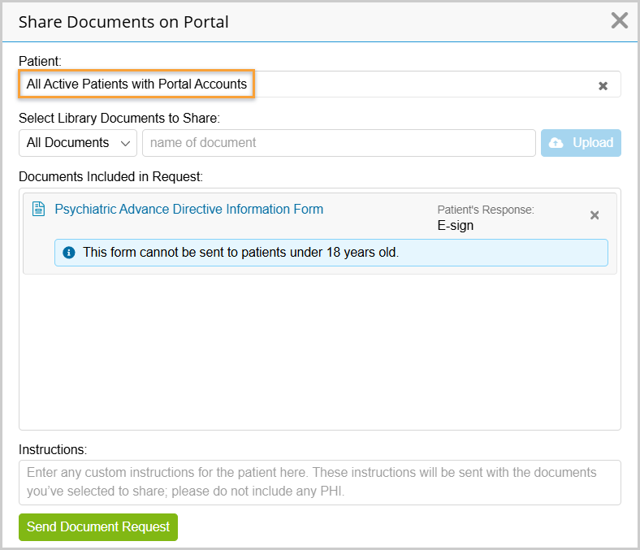
Building on our recent Send to All Patients feature, you can now include the Psychiatric Advance Directive (PAD) Information form in bulk requests. This allows you to send the PAD Information form alongside other forms and documents to all active patients over 18 in a single step. Patients under 18 will automatically not receive the PAD Information Form.
Expanded Checkbox Options for Custom Notes and Portal Forms
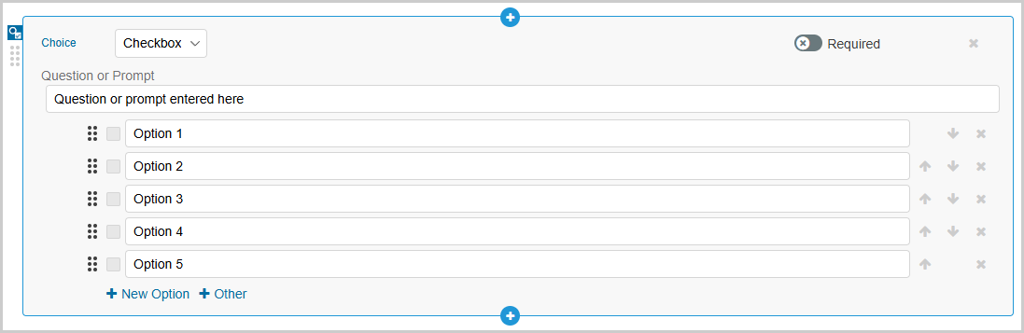
We've increased the number of checkbox options you can configure within the Choice Component, from 15 to 50, when adding in your custom notes and portal forms. This enhancement gives you greater flexibility to capture detailed responses and tailor templates to your practice’s needs.
* The content of this post is intended to serve as general advice and information. It is not to be taken as legal advice and may not account for all rules and regulations in every jurisdiction. For legal advice, please contact an attorney.
Get more content like this, delivered right to your inbox. Subscribe to our newsletter.
More Content You'll Enjoy

What's New: Secondary Claim Validation & Updated Settings

Maintenance Release 2026.02