By TherapyNotes®, LLC on July 28, 2026

We're continuing to improve everyday workflows across TherapyPortal™ and TherapyNotes®. This release introduces a redesigned Emergency & Other Contacts form to simplify contact management, along with medication reconciliation enhancements that support clearer documentation and more informed care.
Simplified Emergency & Other Contacts Form
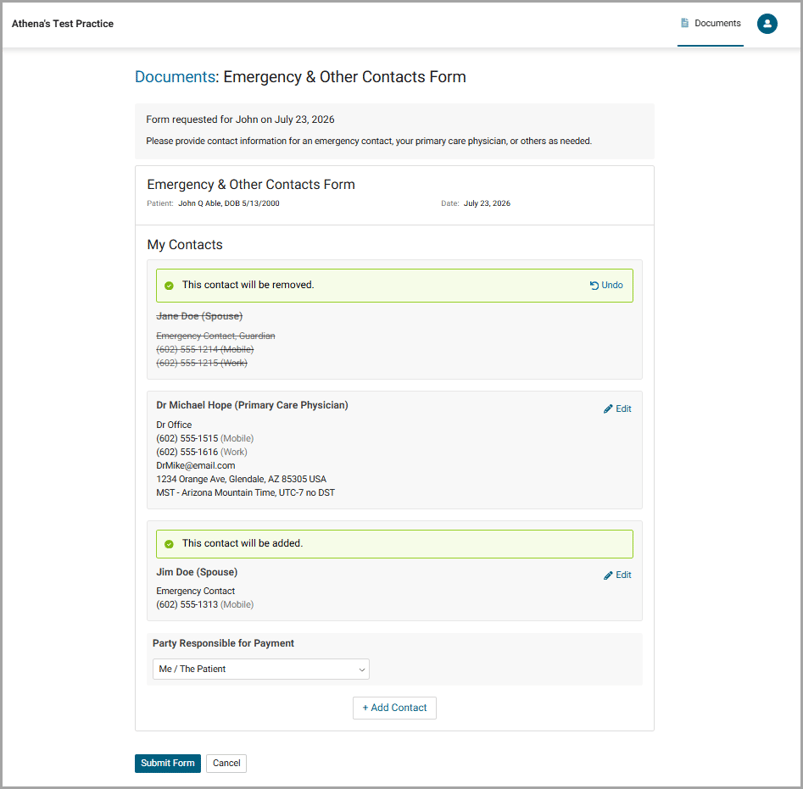
We've redesigned the Emergency & Other Contacts portal form to make it easier for patients to review and update their contact information. The updated form helps practices keep emergency and other important contacts current without requiring staff to make routine updates.
Patients can now add, update, or remove their own contacts using the portal’s Emergency & Other Contacts Form. Practice Contacts linked to the client will also be presented in the form, allowing patients to update relationship details while preserving contact information managed by the practice. As they do today, submitted changes continue to be reviewed by your practice before they are applied to the patient's record, giving you full control over which updates are accepted.
The updated experience also features a modern, mobile-friendly design with easy-to-read contact cards, a simplified process for adding new contacts, and a clear review step that shows whether each contact will be added, updated, or removed before the form is submitted. To familiarize yourself with the changes, administrators can preview the updated form from the Library.
After the form has been submitted, patients cannot make additional changes to that submission. If updates are needed later, your practice can send a new Emergency & Other Contacts form or make the form Always Available through TherapyPortal™, allowing patients to submit updated information whenever needed.
Together, these updates make it easier for patients to keep their contact information current while reducing administrative work for your practice. This update will be rolled out to all practices over the next week. You’ll know it’s live for your practice when you see the updated portal form in your Library.
Enhanced Medication Reconciliation in Psychiatry Notes
We've made additional improvements to medication reconciliation in psychiatry notes to make medication lists easier to review and document.
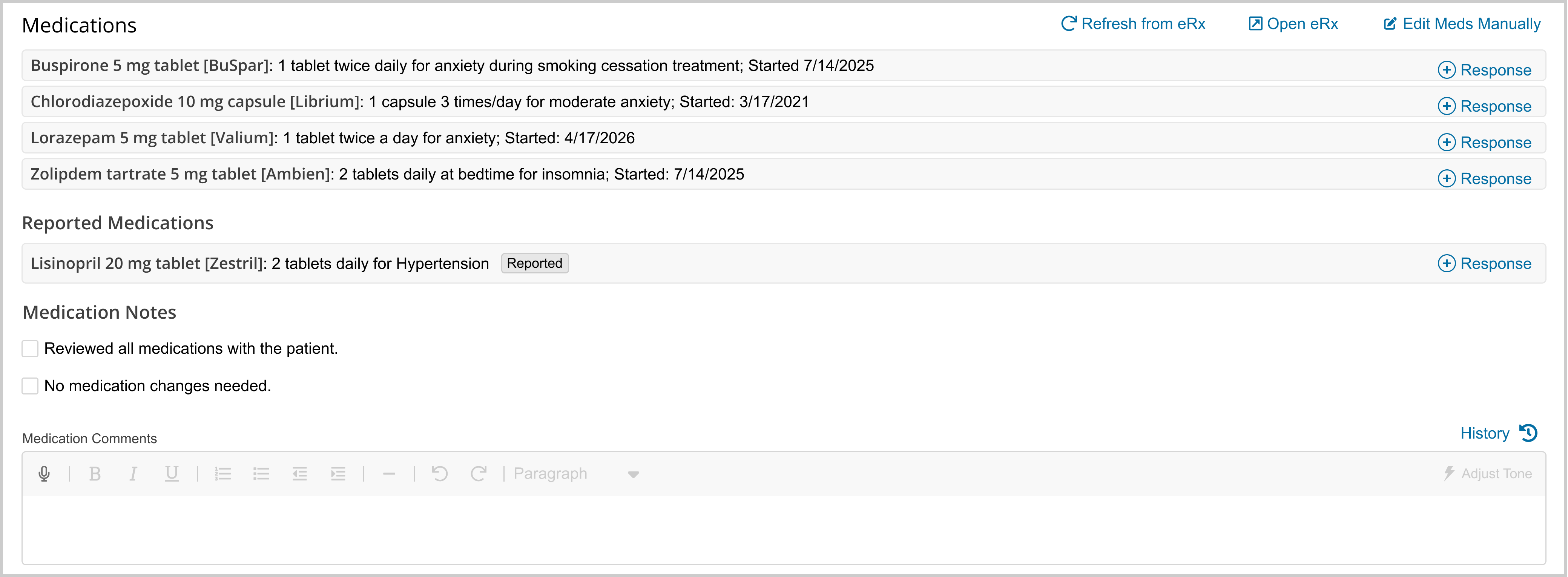
A new Reported Medications section separates medications you prescribe from medications reported by the patient or prescribed by other providers. This provides a clearer view of the medications you manage while maintaining a complete picture of the patient's current medication regimen.
We've also added an optional Response to Medication field, allowing clinicians to document medication effectiveness, patient response, side effects, and other ongoing medication-related observations directly alongside each medication.
For practices using DrFirst ePrescribe, the Response to Medication field is available when documenting continued or adjusted medications. For all other medication workflows, it is available when documenting continued medications. Continue documenting medication changes using your existing workflow, including the Reason field and ePrescribe experience where applicable.
* The content of this post is intended to serve as general advice and information. It is not to be taken as legal advice and may not account for all rules and regulations in every jurisdiction. For legal advice, please contact an attorney.
Get more content like this, delivered right to your inbox. Subscribe to our newsletter.
More Content You'll Enjoy
What’s New: Secondary Billing Improvements & Enhanced Client Feedback Form

What’s New: TherapyFuel® ReFuel & ePrescribe Updates
